Gemini Watermark Remover
Remove the visible Google Gemini watermark and sparkle logo from your AI-generated images directly in your browser. Free, online, lossless reverse alpha de-blending with zero uploads and no signup required.
Drop your Gemini images here
or click anywhere to select from your device
Batch Processing Queue
0 / 0 Processed (0%)
Remove the Gemini Watermark Without Cropping Your Image
Traditional methods force you to crop off the bottom corner of your image—cutting away 10% to 15% of your canvas and ruining your carefully tuned composition. WatermarkCleaner uses reverse alpha de-blending to mathematically reconstruct the original pixels behind the watermark, preserving 100% of your original image frame.
Why Cropping Fails
Cropping changes the aspect ratio, cuts off focal points, and permanently loses resolution.
Why Reverse Alpha Succeeds
Our engine calculates the original RGB values before Google applied the alpha composite, keeping full dimensions intact.
How to Remove a Gemini Watermark
Clean your Google Gemini AI images in three simple, private steps directly within your web browser.

Upload Your Gemini Image
Drag and drop your Gemini-generated image into the upload box above, or click to choose a PNG, JPG, or WebP file from your device. You can also select multiple files to process in batch.
Remove the Visible Watermark
The engine automatically scans the image dimensions, locates the exact bounding coordinates of the corner sparkle, and applies the reverse alpha de-blending formula to restore the original pixel data.
Preview and Download
Use the interactive comparison slider to inspect the cleaned area against the original. When satisfied, click Download to save your full-resolution cleaned image with zero quality loss.
What Is the Gemini Watermark?
The visible Gemini watermark is a semi-transparent, four-pointed sparkle emblem automatically placed near the corner of synthetic images created by Google’s Gemini Apps and Imagen models.
The sparkle graphic represents Google’s generative AI branding. Google applies it to visual outputs to provide transparency, letting human viewers immediately recognize that an image was created by an artificial intelligence model rather than captured with a physical camera or drawn manually.
Users see this mark typically in the lower-right or lower-left corner of the visual. Its size and margin follow strict geometric rules: a 48px mark with 32px margins on images up to 1024px, and a 96px mark with 64px margins on images above 1024px resolution.
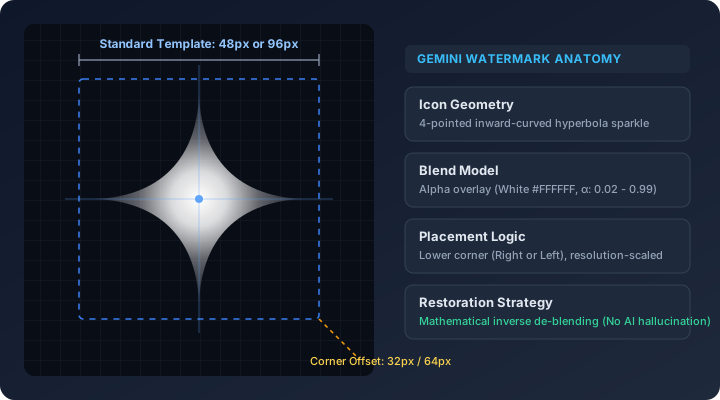
Gemini Watermark vs. Gemini Logo: What’s the Difference?
When looking for ways to clean AI-generated images, users often search using different terms, including "Gemini watermark", "Gemini logo", "Gemini sparkle", "Gemini icon", and "Gemini mark".
In practice, these all describe the exact same visual element. Google’s official brand mark for Gemini is a four-pointed star or sparkle icon. When burned into an exported visual file, this logo functions as a digital watermark overlay.
Regardless of which term you use, the mathematical structure is identical: a known alpha transparency mask blended with white luminescence. WatermarkCleaner targets and removes this mark seamlessly.
Can You Turn Off the Gemini Watermark?
Google now provides a "Media Watermark" setting in Gemini Apps for some users that controls whether the visible watermark is added to newly generated images. However, this setting is not universally available.
Availability varies depending on your account tier, subscription status (such as Google One AI Premium or Google Workspace editions), and geographical region. For example, specific regulatory frameworks in certain jurisdictions (such as the European Union and the UK) or account types may restrict access to the toggle.
Importantly, the Media Watermark toggle only controls the visible surface graphic—it does NOT disable invisible SynthID watermarking or remove Content Credentials provenance data.
Furthermore, turning off the setting in Gemini only applies to future generations. If you have existing downloaded images that already contain the visible watermark burned into their pixels, changing the setting does not alter those files. That is why an online tool like WatermarkCleaner is essential for cleaning existing Gemini images.
Your Image Stays in Your Browser
Your privacy is non-negotiable. Unlike cloud-based editing services that transfer your images to remote servers, WatermarkCleaner operates 100% inside your client browser.

100% Local Browser Execution
Every computation, alpha map extraction, and pixel calculation runs entirely on your device using HTML5 Canvas and JavaScript.
Zero Server Uploads
Your images are never transmitted across the network. Disconnect your internet connection after loading the page, and the watermark cleaner will still work perfectly.
No Cloud Storage or Caching
Because your files never leave your device, no copies are saved, logged, or viewed by anyone.
No Account or Registration
Use the tool instantly without submitting your email, creating a password, or logging into any service.
How Does the Gemini Watermark Remover Work?
Instead of destructive AI inpainting that guesses and hallucinates what might be behind the watermark, WatermarkCleaner uses exact reverse alpha de-blending to restore the original pixel values.
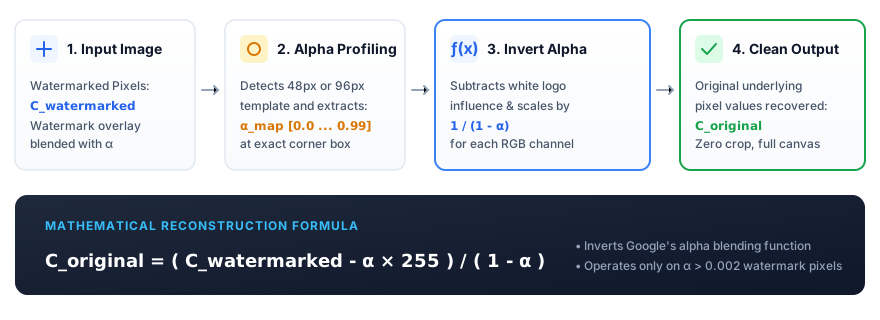
Visible Watermark Overlay
Google composites the watermark by blending white pixels (value 255) with the original image using a variable opacity alpha mask (α).
Identify Watermark Characteristics
Our engine reads the image resolution to match the exact 48px or 96px template and computes the exact corner bounding box coordinates.
Reverse the Blending Equation
Google's alpha blend formula is C_watermarked = (1 - α) × C_original + α × 255. We mathematically invert this: C_original = (C_watermarked - α × 255) / (1 - α).
Reconstruct Affected Pixels
The original RGB values are restored pixel-by-pixel, while leaving all surrounding pixels across the rest of the image 100% untouched.
Technical note: This mathematical approach achieves exceptional, clean recovery on original PNG files and high-quality exports. If an image has undergone severe JPEG compression before uploading, minor quantization artifacts from compression noise may remain.
Supported Image Formats
WatermarkCleaner supports all standard visual formats exported by Gemini and other image generation tools.
PNG (.png)
Lossless format providing the cleanest pixel recovery with zero compression noise.
JPG / JPEG (.jpg, .jpeg)
Standard export format from Gemini Apps. Supported across all resolutions and standard quality levels.
WebP (.webp)
Modern high-efficiency web image format. Decoded and cleaned losslessly.
Batch Processing Support
Process dozens of images in parallel directly in your browser queue and download everything in a clean .ZIP archive.
File Size & Limits
No arbitrary server file size caps. The tool handles high-resolution 2K and 4K images up to your device browser memory limits.
How to Get the Best Gemini Watermark Removal Results
Follow these practical recommendations to achieve the cleanest, most accurate pixel restoration.
Use the Original Gemini Download
Always upload the original file downloaded directly from Gemini Apps. Avoid taking a desktop or mobile screenshot, as screenshots introduce scaling changes and alter the watermark corner offset.
Avoid Recompressing the Image First
Do not pass the image through messaging apps (such as WhatsApp, Telegram, or Discord) that apply lossy re-compression before cleaning, as this damages the exact alpha channel values.
Keep the Original Resolution
Do not crop or resize the image before processing. The engine relies on standard Gemini resolution metrics (48px or 96px templates) to position the de-blending mask accurately.
Preview the Result Before Downloading
Use our interactive comparison slider to examine the cleaned corner at 100% scale before clicking download.
Does Removing the Gemini Watermark Remove SynthID?
No. Removing the visible Gemini watermark does not remove, bypass, or alter SynthID.
It is important to understand the technical distinction between the visible watermark and invisible provenance systems:
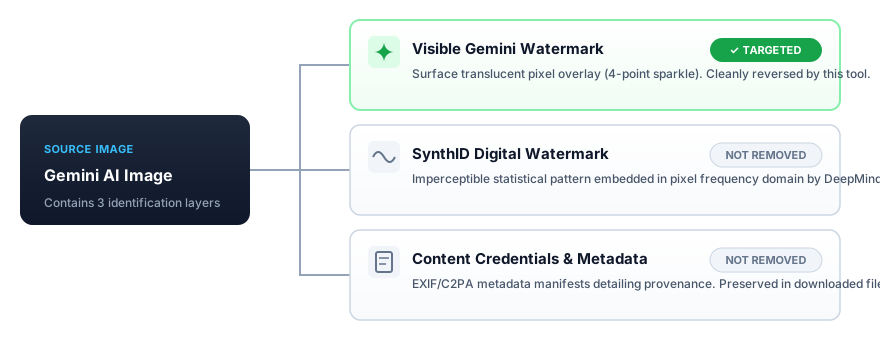
1. Visible Gemini Watermark (Targeted by this tool)
A surface-level graphical overlay consisting of semi-transparent pixels in the lower corner of the visual. This tool targets and removes this visible mark.
2. SynthID (Not Removed)
A digital watermarking technology developed by Google DeepMind. SynthID embeds imperceptible statistical perturbations directly into the frequency components of the image data across the entire canvas. It cannot be seen by the human eye, is designed to survive cropping and filtering, and is NOT modified by this tool.
3. Content Credentials & Metadata (Not Removed)
Cryptographic metadata manifests (such as C2PA standards) embedded in the image container headers. WatermarkCleaner does not tamper with or erase AI provenance metadata.
What This Gemini Watermark Remover Can and Cannot Do
We believe in clear, truthful communication. Here is an honest breakdown of our capabilities and boundaries.
- Remove the supported visible Gemini 4-pointed sparkle watermark from AI images
- Process supported image formats (PNG, JPEG, WebP) at full native resolution
- Process images 100% locally in your web browser with complete client-side privacy
- Preserve original image dimensions without cropping away edges or scaling down pixels
- Process multiple files at once in a batch queue and export all cleaned results as a ZIP file
- Cannot remove invisible SynthID watermarks embedded in the frequency spectrum
- Cannot erase AI provenance or tamper with Content Credentials metadata
- Cannot guarantee pixel-perfect recovery if the image was heavily re-compressed or resized prior to upload
- Cannot remove arbitrary unrelated watermarks or logos from other platforms (Midjourney, DALL-E, stock libraries, etc.)
Why Remove the Gemini Watermark?
Common, practical scenarios where creators and professionals benefit from clean image presentation.
Personal Projects & Wallpapers
Set your custom AI creations as clean desktop backgrounds, lock screens, or personal creative collections without distracting corner logos.
Presentations & Slide Decks
Incorporate clean visuals into client slide decks, academic presentations, and executive summaries with polished visual aesthetics.
Design & Creative Work
Integrate generated concept art, textures, and mockups seamlessly into broader graphic design layouts and UI prototypes.
Social Media Content
Share your creative visual ideas with community followers and friends without a branding overlay obstructing the corner.
Frequently Asked Questions
Find concise, factual answers to common questions regarding Gemini watermark removal.
The Gemini watermark is a visible, semi-transparent four-pointed sparkle emblem automatically placed in the corner of images generated by Google's Gemini Apps and Imagen models. It serves as an attribution indicator denoting that the visual was created using generative artificial intelligence.
To remove the watermark, drag and drop your Gemini image into the upload box on this page. The tool automatically detects the watermark coordinates and applies reverse alpha de-blending to restore the original pixels. You can preview the result with the interactive comparison slider and download the full-resolution cleaned image.
Yes. The terms "Gemini logo" and "Gemini watermark" refer to the exact same visual element—the four-pointed sparkle graphic in the corner. This tool cleanly reverses the alpha blending of the logo overlay without requiring you to crop the image.
Yes, WatermarkCleaner is completely free. There are no subscription fees, credit systems, hidden paywalls, or account signup requirements. You can clean single images or process batches of files at no cost.
Yes. WatermarkCleaner runs entirely online in your web browser. You do not need to install software, extensions, or command-line scripts. Simply open the website on desktop or mobile and upload your file.
No. All processing happens 100% locally on your device within your web browser using HTML5 Canvas and JavaScript. Your images are never sent across the internet to any server, cloud storage, or third party, ensuring total privacy.
WatermarkCleaner supports PNG, JPEG (.jpg, .jpeg), and WebP formats. It maintains the original color depth and pixel dimensions of your uploaded file without downscaling.
Yes. If you have previously generated and downloaded Gemini images that contain the visible watermark, you can upload them here at any time to restore the underlying pixels.
Google provides a "Media Watermark" setting in Gemini Apps for some user accounts and subscription tiers (such as Google One AI Premium or Google Workspace). However, this toggle is not available in all regions or account tiers, and it only applies to future generations. It cannot retroactively clean downloaded images that already have the visible watermark burned into their pixels.
No. This tool removes only the visible surface watermark. SynthID is an imperceptible digital watermark embedded into the pixel frequency spectrum across the entire image by Google DeepMind. This tool does not remove SynthID or tamper with cryptographic Content Credentials metadata.
Remove a Gemini Watermark in Seconds
Upload your Gemini AI image to restore the original pixels with fast, lossless reverse alpha de-blending.